



Steps to Download the APK for Android


STEP 1:
Click “Download Android” above, or visit www.winbox-game.com to download the app.
STEP 2:
Select “Download Android”, then click “OK.” Once the download is complete, select “Open” to launch the file.
STEP 3:
Click “Install” to install the app. Once the installation is complete, you can log in to the app.


Winbox Download Malaysia – Android APK & iOS App Guide
The Winbox Download guide helps Malaysia users understand how to install and access Winbox on supported Android and iOS devices. Android users should follow the verified APK installation method shown on this page, while iPhone users should use the current iOS installation option provided by Winbox. Before installing anything, check the download source, app version, file information, and device requirements. This guide also explains installation steps, APK security warnings, app updates, common download problems, and basic checks you can make before opening the Winbox app.
Winbox Download for Android & iOS in Malaysia
Winbox is used on compatible mobile devices, but the installation process differs for Android and iPhone.
Android users receive an APK file that must be downloaded and installed manually. Because APK files can come from outside the Google Play Store, Android ask for additional installation permission.
iPhone users should follow the current iOS installation method provided through the verified Winbox download page. Do not use Android APK files on an iPhone because APK is an Android file format.
How to Download Winbox APK on Android
If Winbox currently provides an Android APK, follow these steps.
Step 1: Open the Winbox Download Page
Open the verified Winbox website using your Android browser and go to the app download section.
Check the full website address before downloading any file.
Step 2: Select Android Download
Tap the Android or APK download button.
Your browser ask whether you want to download the APK file. Confirm the download only after checking that the source matches the verified information shown on this page.
Step 3: Allow Installation Permission if Required
Android block installation from a browser until you give that browser temporary permission to install an application.
Open the relevant Android setting only when prompted and allow installation for the browser or file manager you are currently using.
Step 4: Install the Winbox APK
Open the downloaded APK and select Install.
Wait until Android confirms that installation is complete.
Step 5: Open the Winbox App
After installation, select Open or locate the Winbox app on your phone.
Existing users can then continue to the Winbox Login section using their account credentials.
Step 6: Review Installation Permission
If you temporarily allowed your browser to install unknown apps, you return to your Android settings and disable that permission after the installation has finished.
How to Install Winbox on iPhone
The iPhone installation process is different from Android.
Do not download an Android APK file on an iPhone.
Use only the current iOS installation option provided through the verified Winbox download page.
Step 1: Open the Winbox Website on Your iPhone
Use Safari or another supported browser and navigate to the download page.
Step 2: Select the iOS Download Option
Choose the option specifically marked for iPhone or iOS.
Step 3: Follow the Displayed iOS Instructions
Complete the current installation steps shown on your device.
The exact process can change depending on the current distribution method, so screenshots on this page should match the live Winbox installation process.
Step 4: Open Winbox
After installation or setup is complete, open Winbox and use your existing account details to sign in.
If you are unsure whether an installation prompt is genuine, return to the verified Winbox download page rather than continuing through an unknown third-party link.
Login After Installing Winbox
Already have an account?
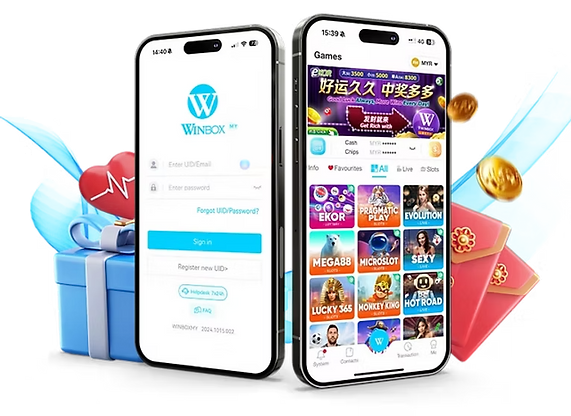
After installing the app successfully, open Winbox and enter your registered account details.
If you need help accessing your account, visit the Winbox Login guide for web, H5, mobile login, password recovery, and troubleshooting instructions.
New to Winbox Users?
Users who do not already have an account should complete the available registration process before trying to log in through the app.
Review the registration requirements, provide accurate information, and create a strong password that you do not use on other websites.
Once your account has been created successfully, you can return to the app and sign in using your registered credentials.
Winbox Download FAQs
Is the Winbox app available for Android?
Winbox provide an Android APK for compatible devices. Check the current Android download information and system requirements shown on this page before installing the file.
How do I download the Winbox APK?
Open the verified Winbox download page, select the Android download option, allow the APK to finish downloading, and follow your Android installation prompts. Only install the file after checking its source.
Can I download Winbox on iPhone?
Winbox provide an iOS access or installation option for compatible iPhones. Follow the current iOS instructions shown on the verified download page rather than attempting to install an Android APK.
Why does Android block the Winbox APK?
Android can restrict APK installations from outside its normal app-store process. Your device ask you to allow temporary installation permission for the browser or file manager being used.
Why is my Winbox APK not installing?
Common reasons include insufficient storage, an incomplete download, an unsupported Android version, or a conflict with an existing installation. Check your device requirements and download the APK again from the verified source if necessary.
How much storage does the Winbox app require?
The required storage depends on the current app version. Check the latest verified file size and device requirements listed at the top of this page before downloading.
How do I update the Winbox app?
Check whether a newer version is available through the verified Winbox download page and follow the Android or iOS update instructions provided for your device.
Do I need to create a new account after installing Winbox?
Existing users normally use their current account credentials after installing the app. New users should complete the available registration process before attempting to sign in.
Can I use Winbox without downloading the app?
If supported, users be able to access Winbox through a web or H5 browser option without installing the mobile app. Refer to the Winbox login information for the currently available access methods.
How can I check whether I downloaded the correct Winbox app?
Confirm the download source, app version, file size, and installation instructions against the verified information on this page. Avoid APK files from unknown websites, messages, or unofficial sharing services.